Numbers
Javascript has only one time of number, which can be written or without decimels, with decimels and with sceintific - notatation. For example, 123e2 is 12300. 123e-2 is 1.23. Inegers in here are occurate upto 15 digits and the maximum decimel number is 17.
Javascript uses + oeprater for both concatination(addition of strings) and addition of numbers. As such note the following:
- If you add two numbers, the result will be a number and if you add two strings the result will be a string
- If you add a number and a string, the result would be a a string. For example:
var i = 90;
var j = "90";
var k = i +j;
//In this nxase, k is 9090
- Also, note the javascript interpreter works from left to
right. So, if you're adding 30+20+"90", the result would be
5090.
- If you divide the strings "100"/"100", the result would
1. However if you divide "100"/"word", the result would be a NaN, type(Not a Number)) You can use the global javascript
function isNaN(x), to check if soemthing is x is not a
number. The type of NaN, is a number.
- Dividing by zero, generates infinity.
Javascript interpretes a value as hexadecimel if they're
proceded by 0x. Never precede a number by 0, as it might be
interpreted as octal. Octal is base 8, hexa is 16, deci is 10
binary is 2.
Normally, javascript numbers are primitive but they can be
declared as objects using the new keyword. For example:
var myNum = new Number(5);
When using the == operator for comaprison, equal numbers
are equal. However, the ===, we examen equality in both type and value. To add, objects can not be compared.
Arithmatic
Arithmetic operaters are as follows
- + : Addition
- - : subtraction
- * : multiplication
- ** : exponentiation
- / : divition
- % : modulas
- ++: increment
- —: decrement
These operate in two literals as in 1+2, or 2 variables as in a+b. The numbers in this case are called operands.
Variables
A variable is a placeholder for a data storage. Data can be
Numbers, users or anything else. In old days, javascript used the var keyword to delcare a variable. But now there is also cosnt &
let. These are the 3 ways to declare a variable:
var x = 0;
let x = 0
const x = 0;
What is the differences between these? The most prominent is
that const is used to declare an unchanging const. So the name of
cosnt variable declaration can not be used again. The difference between var and let lies in scope. The scope of let variable is in inside closing and opening brackets where as the var is within
a function or global.
Data Types
Javascript is a dynamically typed language, meaning a variable
can at a time be one data type and in another be different data
type. It can once be a string, and the next time be a number.
There are eight different data types in javascript.
- Number: The first thing defined in this document. Look
above
- BigInt: Relatively new. The data type Number can not
represent numbers bigger then 2^53 and once less than -2^53.
Therefore a BigInt variable is created by appending n to the
end of a literal. as in 100000n.
- Strings: Strings in javascript are wrapped around in
eitehr of "double" quotes, 'single' `backstick` quotes. The farmer two are the same, the latter one, backsticks, comes with tools. For example, you can embed variables or expressions into them. For example:
str = `Hey, your name is ${name}]`
- boolean: Boolean has only two values, true and false
- null: which doesn't mean null value. It means empty or unknown value.
- undefined: this is the type for variables that are declared but not intialised
- object: All other types are primitive types and this is reference type.
- Symbol: Used to make a unique identifier for objects
Strings
a string is a piece of text in programming. Know about the following string information in javascript
- You declare a string as you would a number, but you must surround the string by quotes
- Scaping characters: You can't just put a ' inside of a string because the browser would read it as the closing quote. To make the browser not read as a code but as a part of a string put backslash before that character.
- Concatinating Strings: This is a fancy word for joining strings. You can join them by using the + operater. You can also join the variables that hold strings resulting in string concatination of their valuess. Lastly, you can add a Number and a String, in which case the number would be converted toString.
- The .length method returns the length of a string. For example, str1.length.
-
- the .indexOf(x). emthod returns the first occurance of the passed string where as the .lastIndexOf(x) method returns the l;ast occurance of a string. If these two methods don't find what they're looking for, they return-1. Both methods can take a secomnd argument for the start position(index). If you're using a regular expression, it is better to use the search() method instead.
- Extracting: There are three methods you may use for this.
slice(start, end);
substring(start, end)
substr(start, length)
/*the slice method is what sounds like. Just note that u can start from the end by passing a negative index. And if you ommit the last index, and give it just one parameter, it will slice upto the end. The substring is the same, except in that it doesn't take negaitve values. And substr is different in that the latter parameter, especifies the length of the sliced portion.
- The replace method takes two parameters, what to replace, and the new replacement, respectively.
- Know that you can use toUpperCase() and toLowerCase() methods for case manipulation.
- The charAt(x) method returns the characetr at given index.
- The .split(",") method returns an array fo the strig splitting at comas.Pass "" for single characters.
Intro to conditionals
We can teach computers to make decisions given certain conditions; however, one needs the tools to deliver those lessons to the computer
Inorder to set conditions, we need soemthing called if, and inorder to make if's we need comparison oeprators. For example, if weather is less than 25, wear jackets. As such beware of the following symbols and their meaning to the computer:
- Greater then and less than: z > y, z < y.
- greater than or equal to and less than or equal to: z > y, z < y.
- Equals to: z == y
- Not equals: a != b
The computer is able to compare certain things. Thanks to the previous work of computer scientists. For example, if we do:
alert(2 >1)
It will return to us true. The two values, true and false, are called booleans and as mentioned in data types have their own data type. You might wonder what would happen if we comapre two strings.for example, this:
alert('a' > 'b')
In that case javscript uses lexicographical order. It compares the first two strinsg and sees which one is greater in alphabeticla position. A lower case letter is treated as being more than a uppercase letter. In javscript, if you compare a boolean and a number, true becomes 1 and false becomes 0. Same with empty string, it becomes zero. Also, null become zero and undefined becomes NaN. But note null is only >= 0. That is the only guierentee.
switch, if and else if
To perform different actions, we require if statements. We have three types of if statements in javascript: (1)if-else, (2)else if, and (3) switch statements. Letus treat each seprately.
- Take two examples about if else statements
//example 1
if(age > 18){
can vote = trrue;
}
//example 2
if(age > 18){
can vote = trrue;
}else{
can vote = false;
}
Note how the first can be without an else statements but the latter must be proceeded by an if statement.
- else if is used for more conditons. For example:
if(age > 18){
can vote = trrue;
}else if(age > 25){
selective_service = false;
}else if(age > 45){
senior_citizen = true;
}else{
young = true;
}
-
If we have quite a lot of conditions, then enter swithcs. Let's look at an example:
switch (new Date().getDay()) {
case 6:
text = "Today is Saturday";
break;
case 0:
text = "Today is Sunday";
break;
default:
text = "Looking forward to the Weekend";
}
This switch satements gets first the date, then dependig on it's number, names it. The break word breaks out of the case to go to the nexton and default keyword especifies what to be executed if all other cases are not true.
Multiple comparison Statements
What if we want to check two conditions, like if it's weekend and an afetrnoon. Should we need to nest two if functions on top of the other? No, we have logical operaters: (1) || which denotes OR, (2) && which denotes AND, (3) !, which denotes NOT.We can use them in our above scenario:
if(weekend && afternoon){
hoppiesTime = True;
}
Note, a truthy value is simply a a true boolean and a falsy value is imply a false value. Any object in javascript is truthy.. The order of precedence for these is as follows:
AND, ||, Not.
Fucntions
We don't want to write the same code over and over again. Infact, if we write the same code more than one time, it's a good diea to bundle it into one block called fucntion and call it as we need it. Suppose we we have a restourent page and we want to show on everyone's profile, hi name, where the name is given person's name. Then our function would look like this:
function greeting(name){
document.write('hi'+name);
}
Above we declared a function that takes a name as a perimeeter and returns a speific greeting for a anyone. If we want to say high to zack, now we don't have to wrewwrite all of that coe. We can just call our function and pass the name zack as this:
greeting(zack);
argument
Any argument of a function can be accessed using the argument. The argument is recognized variable in each function that holds the argument passed to it in a n array like thing. You can be certain for now tht ou can use the length proeprty on that array.
Another way to declare a function?
Yes, there is another more concise way way to declare a funciton for example:
let myf = (arg1, 1rg2) =>expression;
Good Practices
Be consistent with indentaiton
and everything.
Make thy variables and function names descriptive. Variables start with a noun and functions start with a verb.
Take commenting on the functionality of your code seriously. Why, how? author? date? What can't the code tell us?
Break problems into as small as necessery functions to solf them. Ideally, each function should do exactly one thing and do it good. Then compose them later.
Don't mix languages, certianly don't mix CSS, HTML and Javascript whenever you can.
It's betterif your code is so self explanatory that it needs no commensts.
Arrays in javascript
These help us store mutiple variables of same data in single list. For example, the names of students in one class can be stored as:
let students = ["Ahmed", "Anna", "Ali"];
//Also same thing as spaces and lines are not importante
let students = ["Ahmed",
"Anna",
"Ali"];
The elements in array are stored in indexis. For example, the first element is in index 0, the second element is in index 1 and so on. In above example if I want to get the name of the first student, I would just access it as
nameFirst = students[0];
//I can also change the second students name as
students[1] = "John";
Notable Array Methods
- .toString(): converts the array to a list seperated by commas
- .join(): joins the array into a comma separated string. In addition you can pass a peramater within a quotation marks as a separeter.
- .pop(): removes the last element from an array. It returns what was poped.
- .push(x): Adds a new element to the end.
- .shift(): removes the first element, shifts everything down an index once, returns what was removed.
- .unshift(): Adds a new element to the beggining, shifts up everything, returns new length.
- .length: this property returns the length of the array, which is also last index +1.
- The operator delete can delete indexis using the syntax: delete arrayName[index]
- .splace(index, newElement): the first parameter definex the index of element to be added, the second defines how many elements should be removed, the last parameter defines what to be added.
- .concat(another array), concatinates two arrays together. It can take any numbers of arguments.
- .slice(startingIndex) and .slice(startIndex, endIndex). The first returns a lice of the array starting form the argument and the second returns a slice starting from startIndex and ending at the second argument.
-
Filter exanple. given an array of inventor objects with keys name and passed year. Below filters to those born 1500s.
let fifteens = inventors.filer(function(inventor){
if(inventor.year >== 1500 && inventor.year <= 1600){
return true; //keep it
}
});
- map example. Gives another array of inventors first and lastname
const fullNames = inventors.map(inventor => inventor.first+ ' ' + inventor.last);
- sort ex: sorts by birdthay olders to youngets.
const ordered = inventors.sort(function(a, b){
if( a.year > b.year){return 1;}else{return -1;}
})
- reduce: builds soemthing from everyone, sort of like loop.
cosnt totalYears = inventors.reduece((total, inventor) => {return total + (inventor.passed-inventor.year)}, o);
- Array.from(nodes): returns an array of ndoes.
Javascript Objects
Six of the eight data types in javascript are primitive because the hold only one value. In contrast, objects are used to store key-value pairs and more complex things. An object can be created with brackets {}, within the prackets put "key": value, pairs, where key is a string and value can be anything. You can create an empty object intwo ways:
let object1 = new Object(); //object constructer syntax
or
let object1 = {}; //object literal syntax.
Know that a key is also known as identifier or name. Lets look at an example. And see what we can do with this new object.
let user = {
name: zak;,
age: 22;,
"city born" = "hargeisa"; //note multi word proeprties need quoted. it's also thus accessed with square brackets and quotes without dot. also note the trailing comma.
}
- user.name; : returns zak.
- user.lastName; = "yusuf" : adds lastname yusuf.
- delete user.name; : deletes user name.
- user[name]: also gives us zak.
- We can put a computed property name such as an expression or variable in a inside square brackets.
- In object, there is no reserved word restriction. Except "__proto__"
- We can make a fucntion take takes proeprties as parameters and returns a made obejct for us
- user.property === undefined, lets as check wetehr a proeprty exists. A similiar one is "key" in object. The latter works in the case where a key hodls undefined, so it's better? perhaps.
- To loop through all proeprties use for(key in object).
- Keyse are sorted in order if their names are inegers like "1". If the're not inegers however, they're sorted in declared order.
- An object declared as constant can be editied.
- Object.assign(newobject, ob1, ob2...obn): copies objects to objectnew.
- let copy = Object.assign({}, oldObject), clones.
- To clone an object that it's keys are objects, use deepCloning.
Know that an object is stored by reference, that is it's name stores a string pointing to the address of it's location in memory. therefore, if you try to copy an object, you just store it into different names because you copied it's adress.
Classes in Js
unlike java or other OO languages, objects do not need
A DNA or blue print. However, you can plug characterstics to them via prototybal inheritense. So, the classes ins js are fundamentally different, yet the new class syntax in ES6(ECMA Script) have the same syntax as OO. Take these classess as second classes citizens, the first is functional in js. The syntax? Drink from below. Note, that the type of any javascript class is, drumroll please? a Funtion. It supports extends and some other sefull things. Read it online.
//syntax
class nameItWhatUWant{
#privateVar= 0;
publicvar = 0;
constructer(){
}
method(){}
...more methods
}
//example
class birds{
constructer(type){
this.type = type;
}
fly(){
//
}
//getetr function
get name(){
return this._name;
}
//setter()
set name(newName){
this._name = newName;
}
}
//making nw bird
let pigeon = new bird('pigeon');
Loops?Enter Computers
Repeptetive tasks that are to be done large amount of times is perhaps why we even have even computers. In programming, this is done through loops. Any 1 particualr repeat of a loop is called an iteraiton.
A loop has a counter. It starts with where we need to star from, usially zero or the end. And ends where we want to end whereupon our loop halts.
When the counter reachs a certain value, our exit contion might be met. In which case, we exit the loop. If we don't know how many loops we might do, there is a speciel type of loops called while loops for that.
Be aware of the following types of loops in javascript and their syntaxis
- forloop: syntax and example.
ERROR DISPLAYING
-
Breaks. If some condition is true you may exit the loop with a break; statement. Using the example above, we might exit the loop of sum of the deposit is more than 100 as:
EROR DISPLAYIMNG
in addition, we might skip an iteration all together. Using above statement, had we wanted to skip deposit number 55, because the person tookit back, we would do it like this.
-
while loops: In the case where we don't know when to end it, as in if we don't know how many deposits there are in the account, we use while loops. They have the following syntax.
//syntax and example.
let i = deposits.length
while(i >0){
sum+ deposits[i]
i—;
}
- do while: the exit condition comes after code is already done in an iteraiton. Here is the syntax
do{
code to run in an iteraiton
}while(conition);
- Sort by lastName
const alpha = people.sort(function(last, next){
const [alast, afirst] = lastOne.split(', ');
const [blast, bfist] = nextOne.split(',');
return alast > blast ? 1: -1;
})
- given an array of mixed transporation called data containing "trucks" "cars" "chevvys" multiplees of eahc, return a tally of each
let trans = data.reduce(function(obj, item){
if(!obj[item]){
obj[item] = 0;
}
obj[item]++;
return obj;
}, { });
- .some. Does an arrray have atleast one of those
const adult = people.some(function(person){
const currentYear = (new Date().getFullYear())
if(currentY- persom >= 18){
return true;
}
})
- .every: counts if theyr'e all adults. just replace above code's some with every. It returns true or false.
- find. returns the first item
const comment = comments.find(function(comment){
if(comment.id === 4545){
return true;
}
})
- Find index. Just replace above codes find with findIndex.
DOM
DOM(Document Object Model) Manipulation
Javascript gives us the power to manipulate when certian things happen such as a click, or they don't happen. With it you can add new elements on the fly and make your aplication more fucntional and usefull. When we do so we're manipulating the DOM. This DOM is a treatment of the markup document(such as HTML or XML) as a tree like structure. This tree has nodes with relationships between them. The node that contains another one(f.e.x, a container div) is called the parent and the nodes inside are called childs. Those who are in the same level are called siblings.
You can select html nodes with javascript and assignment them to a variable and so on. Take the following simple html
<div id="container">
<span id="one"></span>
<span id="two"></span>
</div>
- We may make a container variable as:
container = document.querySelector('#container');
Note, You can also select using this through class with dot(.) instead of #. This gets the first match, however, you may also use SelecterAll. This returns a nodelist, which you may convert to an array.
- We may select div with id two as,
it = console.dir(container.firstElementChild);
- We may select the previous div to the seond sibling by:
const controls = console.dir(controls.previosElementSibling);
Nodes are objects with attributes and methods. Moreoever, we can add new nodes or elements on runtime. Take this:
let div1 = document.createElement('div');
It makes the tagname given. However, it doesn't put your new tag in the page. Before doing so, you need to manipulate it's attributes anyhow. To add it to the page you need:
//to append as the last child of the parent
parentNode.appendChild(childNode
//to append as before specific child.
parentNode.insertBefore(newNode, referenceNode);
)
//to remove a node
parentNode.removeChild(child);
Altering Elements
once you selecrt an element as a variable, you may use any of the below methods of altering:
- setting style: node.style.color = 'something';
- Several styles: node.style.cssText = 'color: blue; background: white;
- set Attribute: node.setAttribute("class", "nameIt)
- get attribute: node.getAttrbiute('id')
- remove attribute: div.removeAttribute('id')
- Adds a text: node.textContent = 'Hello World'
- Add a new text: node.innerHTML = 'Soemthing, might be html code');
NOTE*: Put your javascript tag at the bottom of the html page, thatway it's run after document is made. Or in it's own file.
NOTE*: to access an element i, in ndoelist returned by javascript query, use nodeName.item(i)
Events
Events occur as a result of somehing else, perhaps the user clicking or pressing certain keys.With javascript, we can elt that happen dynamically or demand. There are several ways to go about this:
- attach fucntion attributes of html element using soemthing like onclick="function()". Example:
< button onclick="myFunction">
Note that my funciton must be defined in js.
- You can set on_event_ property on the DOM object in your javascript. Example
//html
//javascript
var myb = document.querySelector('#mybutton');
myb.onclick = () => alert("Hey!");
- Attach event listeners to the nodes in your javascript. This is better than previos ways because in those you can only have one onclick for any element. Example:
//html
<button id="mybutton">clickHere</button>
//javascript
let bttn = document.querySelector('#mybutton');
bttn.addEventListener('click', () => alert("Hey
"))
Take notes here because the last one in the list is the real deal. Here is what ypu can do with the last one in the above list
- When H key in keyboard is tapped: AddEventListenter('keydown', doSomething), then, here is how something might look like(where x is given).
function sommething(e){
if(e.keyCode == "x"{
alert("works!");
}
}
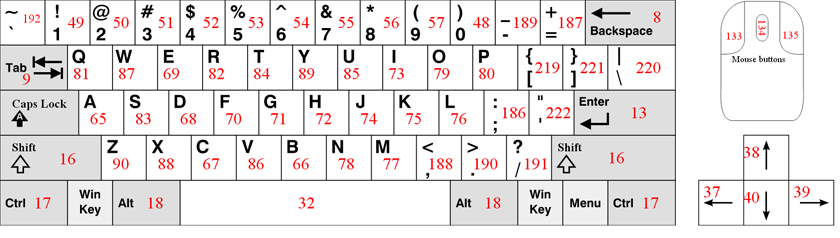
- mousedown: .addeventHandler("mousedown", myfunction), wheremyfunction can be
function sommething(e){
if (event.button == 0) {
console.log("Left button");
} else if (event.button == 1) {
console.log("Middle button");
} else if (event.button == 2) {
console.log("Right button");
}
}
dealing with time
To do something afetr certiantime: setTimeOut(function, time), where time is in miliseconds.
Do something repetetively within an interval: setInterval(method, time), where time is again, in miliseconds.
A Deeper Look
Consider Scope, context and Closure
If you have done javascript coding for a while now you might notice that scope behaves
in javascript is intresting, now is a goodtime to heed. By default, toyou're in the root scope, so if you makes
a variable uninclosed by brackets, you're making it in the window(root or global space or name space).
So, yourvariable.window, has the same value. If you make it in an ofunction, you make a child scope. Remember, the parent gets access to
variables made by it, but not the once made by the children. If you have a conflict of a variable
in parent and child scopes, to access that variable within child, you need to access using a speciel methadology
like variable.window. You cna get into trouble by forgetting the declaration of a variable,
in which it might associated with a parent variable with the same name.
That is called polluting the root. One way around this is "use strict";.
Moreover, each funtion has it's own local scope. All var variables in javascript are made with function scopes, not for loops, if's or switchs.
A function within a function has has access to the outer functions scope, and this is called lexical scope or Closure. This
is not the other way. Javascript resolves variables outwardly and away from the innermost functions. If you want things togo outside
of a function, you must return it and capture it in a variable outside.
Suppose you had a function named greating. Within that function lies a function called hellowgreeting().
In the parent if you want to access hellowgreeting, you must make greeting raturn the function, capture it. Than called
the captured variale as a function. Or do, greeting()(); which calls the returned funciton automatically.
What about this? By default, it refers to the outer most scope, the window scope. In an object constructer, it refers
to an object. So dpending on the scope it cna change. In cases where it causes problem, try setting this to a variable first. Ofcourse,
a variable within scope.
You're able to manipulate scope using .call() and .apply(). Note that the call() method will call your mehtod, thereforre,
no need to do it. Also note, functions make a scope that hides inner functions form the global scope.
- The scope of a variable declared using the let and const key word os within closing and openning prackets. Any funciton, within a funciton
has also a private scope of it's own. There, you cna use them to declare private fucntions within a factory or constructer
function. Takes this as a winky introducktion to encapsualtion in javascript.
-
var variables can be redeclared. This type of variables are function scopes.
Prototype for objects
This is important because javascript doesn't have classical inheritense based on classes. Therefore, all inheritense is based through prototype proerty in javascript. For exmaple, a function is an object, so when you make a constructer class, your object from that constcuter inherits from the constructer object. An example is worth allwords. Look below.
//make a ocnstructer for a car
function Car(){
this. numWheels = 4;
}
//add showInfo to car prototype proeprty
car.prototype.info = function(){
return("I am a " +this.name);
}
//make a toyota constructer
fucntion Toyota(name, color){
this.name = name;
this.color = color;
}
//set toyotas prototype to car;s constructer to inherit all of car's properties and methods.
Toyota.prototype = new Plant();
- A prototype attribute is a characteristic of the object which tells us an objetcs parent(The one it inherits properties from). This attribute is also called the prototype object and is set normally. Note, you can access tge class of an the constructer funciton by doing object.constructer.
- Al objects in javascript created from object lieral or the new keyword inherit form Object.prototype which itsels doesn't inehrit form anything. however, if it's made from a constructer, it inherits from that constructer. That is, it inherits from fruit.prototype. Properties inherited from Object.prototype are constructer, hasOwnProperty(), toString() and so on.
- If you want to set an objects prototype to another constructer, below is how you do it.
function Student(){
}
student.proptotype.sayName = function(){
alert(this.name);
}
function eightGrader(name){
this.name = name;
this.grade = 8;
}
eightGrader.prototype = Object.create(student.prototype);
- A fucntion or property is looked from the prototype object, only if it's missing in the new object.
- If you want to iterate through object's properties, you might use for(key in Object), but to get also prototype keys, you need to use for(let prop in rappt) where the index current variable is prop.
- NOTE*: it's beset to declare functions of objects as Object.prototype.newFunction = something, because then one instance of a function would be shared ratehr than being ducplcated everytime.
Prototypal inheritanse
Javascript allows us to inherit from an object without talking about classes. There are three types of prototypal inheritanse you must be aware of.
- Delegation/differential
- Concatenative inheritance/Cloning/Mixins
- functional inheritance
Design Patterns
To maintain large scale javascript aplications, one must implement a design pattern. There are several types of design patterns that are popular. Here are some.
-
Objetcs as a design pattern
You can design your javascript code in an objective way. For example, in a tictac toa game, you might make an object for each player that hodds player name and amrker(x or o). However, if you are keeping truck of an online store inventory, typingout everything might be dounting. What you need is object constructers. For example, here is how our object constructer for the tic tac toe game would be:
function Player(name, marker){
this.name = name;
this.marker = marker;
}
//declaring a player becomes easy later.
const player1 = new Player('steve', 'X');
Moreover, you can add fucntions to attribute declaration(e.x: this.name = prompt();).
Module Pattern
Did you see this before?
(function(){
//instructions
})();
Perhaps confused? here is what it's. This is called immediately invoked function expression(IIFE, "iffy"). First, note that a fucntion wrapped in a parenthesis is an expression. That expression returnsa value(funciton), put (); and you call it.
This creates a great platform for our aplication to run.
Our intire aplication can now be encapsulated by this. More over, we may set it to a variable like this
var module1 = (function(){
'use strict'
return{
publicmethod: fucntion(){
console.log('hellow world!);
}
};
}());
modle1.publicmethod(); //hello world!
Furtehr, this with encapsulation can make a greta encapsulation with benefits like less naming collision.
factory functions
Object constructor functions are all cool and good, but they have wellknown confusing problems which you can read about
online. An alternative is the factory functions which as a number of advantages over them. Mainly there is no risk, there is
false class made, just a function that makes an object. Take an example of a factory funtion to make a person
object as follows:
const personFactory(name, age)) =>{
const sayHi() => console.log('hi!');
return {name, age, sayHi};
}
var jeff = personFactory('jeff', 27);
jeff.name //jef
Database and storage
local storage and session storage
Your inquiry into this starts as you refresh your page and note all your javacsript data obtained from user is gone.
The first primitive solution as of now to this is the browser features of local storage and local session
which can be interacted as follows with javascript.
-localStorage.something ='something'; //to set
-localStorage.getItem() //to retrieve item.
-localStorage.setItem() //to set item.
But note, this is limited to the computer the user uses.
Other usefull things
linting
Linters are tools that scan your code with style rules of javascript, that reports devitions from recomended js style. Look up, JSHINt or ESLint. for example.
Claint Side form validaiton
This helps as get the 'right' informaiton and keep it save. There are 2 ways to do it. Through html5 and through js.
html 5 form validaiton
First you cam add our respective css for when an input is entered correctly and not (input:invalid{} and input:valid{}). then the simplest requirement youcan add is to add the word required in the opening tag. It can be styled(input:invalid:required{}). You use required pattern attribute and regex for formatiing constraints. You can do many more things like length, min, max, etc etc.
History of libraries
The way libraries use to work back in the day is that
you would download a javascript file and load it just before your other script file in the index. And because you loaded the library script first, you're able to use it in your file.
Around 2010, several competing backage managers emerged to help autamate the process of updating libraries(ex. npm, Bower, and yarn). If you have npm now, you can install a library. Navigate to the folder of your index, enter npm init. Enetr defaults. It makes a json file which is called package.json. It contains info about the project. Then, to install a library go lookitup from npm homepage.
When you install a library, the npm updates the json file to include the installed library in your 'dependencies'. This usefull for sharing it with otehr developers. They only need the package.json. But the problem now is that we have to find the src of the downloaded file to put in the index. We can automate that! But that means we have to find an ecosystem for js autside of the browser. Soemthing long abhored as a security risk. Enter nodejs.
We can, by ndoejs, load files as variables in javascript. as:
var library = require('libraryname goes here');
Yes, it knows where your file recides(src). What helps here is a module budler to find all require statements. Some examples of these ar Browsify and webpack. Wepack itself is an npm package.
npm
Node Package Manager, intially made for node.js. Javascript works on the frontend and was long abhored to make it
work with file systems. this is why we had to put the script or css links at the top of the page. It was the same with
javascript modules packages, no import module in the language, just thsoe scripts with the src tag. With npm and otehr similar
technologies, however, you can use commandline to install virtually every useffull javascript package, keep truck
of your packages(which makes it easier to share becaus eyou now know your pporject dependencies.). Now u don't have to
manually search for, download and install every new module you want to use.
To setup this for your porject, navigate to the directory that contains your folder in cmd line. Type npm init.
Answer the questions. Answer the questions(enter for yes, or enter your alternative answer). that is it, you now have a package.json file
containing info about your project.
webpack
Webpack is a a static module bundler. that means it takes your modularly deisgned program, and bundlers the modules
intom one aplicaiton. It allows as to do this module thing by putting all of our files in one single main.js file. Also, it allows as to castomize
Modules in Javascript
Here is the syntax for importing and exporting a function accross modules.
const functionOne = () => consol.log(works);
export {functionOne}
//the otehr js file
import {functionTwo} from './functionOne';
fucntionOne() // works
You
babale
Some browsers don't support the code you use like ES7. Babel solves this.
Solid Design Principles
Intro to solid
SOLID in js is mnemonic for colelction of design principles. They're:
- The single responsibility principle
- The Open/Closed principle
- Liskov substitution pirnciple
- The interface segregation prinviple
- The dependency invention principle
Single responsibility
It states: A class should have only one reason to change. It just means the given set of behaviors for a module,
funciton, object, class should have all one unifying responsiblity. that wya changing one src code doesn't have
multiple effects. Before coding, one must esterortype the entity being codes as a service provides, information provides
or whatever it does. It's like unix's 'do one thing and do it well'! Your'e allowed to wrap a lot of funtion
in one unifying funciton, but note that those things which the unifying method does has to be a call of funtions and
not spacgeti code.
As mucha syou can avoid tightly coupled objetcs. Things that relie on eachother such that removing one, also required removing
the other. They should be stand alone as mucha s possiple.
The Open Closed Principle
Modules most be open to extention and usage, but closed to modification.
The liskov substitution principle
'if it looks like a duck, but needs batteries, you probably have worng abstraction"(from web.archive's principles posrer).
Basicly, it says if your abstraction of classess have weird logical (coding) problems. You need to remake your
objects and classess inheritanse chain.
The interface segregation principle
It actually refers to interfaces in other staticly typed OOP based langauges like Java, but in here, we
cna still use it as: make sure the bare issentials are required for use of your new module to the outside world.
The dependency invertion module
Also called dependency injection and inveriton of controls. It means that to use a depndency make sure you're taking
as like a parameter that way you can swithc between dependenciess(for example if one dies, or you're no longer allowed
to use it
JSON
Javascript Object Notation, similar to javascript's obejct literal syntax is how data is transmitetd accros the web
from server to frontend. It's string based. JSON is an obejct available in available in js as string, and converting it to object is caleld
deserielization while the otehrwya is called serielization. It can be stored in it's own file with .JSOAN file format. It's nothing but a js object with some proeprties.
To retrieve JSON info, store it's url as a variable, make request cariable using XMLHTTPREquest. Open it. For mroe read JSON mozilla.
send request, hanle response. display data. Note, the .parse() method tajes JSON as parameter and returns javascript object. stringify() takes object and returns JSON.
ASYNC
Since some of javascript's fucntions takes a long time, we have an syncronouse javascript solution. Note the following:
- Callball: a fucntion passed to anotehr fucntion to complete soemthing
- Promises: A way to halde ASYNC js. a promise is an object that might have value at some time. PRomises allow as to tell the code wait for data to come. ex
let data = getData() //if this is refractored to return promise.
data.tehn(function(data));
api
Servers that are created for serving data for otuside use are called APIs. You want to sign up for a key and read there documentation to request data.
Numbers
Javascript has only one time of number, which can be written or without decimels, with decimels and with sceintific - notatation. For example, 123e2 is 12300. 123e-2 is 1.23. Inegers in here are occurate upto 15 digits and the maximum decimel number is 17.
Javascript uses + oeprater for both concatination(addition of strings) and addition of numbers. As such note the following:
- If you add two numbers, the result will be a number and if you add two strings the result will be a string
- If you add a number and a string, the result would be a a string. For example:
- Also, note the javascript interpreter works from left to right. So, if you're adding 30+20+"90", the result would be 5090.
- If you divide the strings "100"/"100", the result would 1. However if you divide "100"/"word", the result would be a NaN, type(Not a Number)) You can use the global javascript function isNaN(x), to check if soemthing is x is not a number. The type of NaN, is a number.
- Dividing by zero, generates infinity.
Javascript interpretes a value as hexadecimel if they're proceded by 0x. Never precede a number by 0, as it might be interpreted as octal. Octal is base 8, hexa is 16, deci is 10 binary is 2.
Normally, javascript numbers are primitive but they can be
declared as objects using the new keyword. For example:
When using the == operator for comaprison, equal numbers are equal. However, the ===, we examen equality in both type and value. To add, objects can not be compared.
Arithmatic
Arithmetic operaters are as follows
- + : Addition
- - : subtraction
- * : multiplication
- ** : exponentiation
- / : divition
- % : modulas
- ++: increment
- —: decrement
These operate in two literals as in 1+2, or 2 variables as in a+b. The numbers in this case are called operands.
Variables
A variable is a placeholder for a data storage. Data can be
Numbers, users or anything else. In old days, javascript used the var keyword to delcare a variable. But now there is also cosnt &
let. These are the 3 ways to declare a variable:
What is the differences between these? The most prominent is that const is used to declare an unchanging const. So the name of cosnt variable declaration can not be used again. The difference between var and let lies in scope. The scope of let variable is in inside closing and opening brackets where as the var is within a function or global.
Data Types
Javascript is a dynamically typed language, meaning a variable
can at a time be one data type and in another be different data
type. It can once be a string, and the next time be a number.
There are eight different data types in javascript.
- Number: The first thing defined in this document. Look above
- BigInt: Relatively new. The data type Number can not represent numbers bigger then 2^53 and once less than -2^53. Therefore a BigInt variable is created by appending n to the end of a literal. as in 100000n.
- Strings: Strings in javascript are wrapped around in
eitehr of "double" quotes, 'single' `backstick` quotes. The farmer two are the same, the latter one, backsticks, comes with tools. For example, you can embed variables or expressions into them. For example:
- boolean: Boolean has only two values, true and false
- null: which doesn't mean null value. It means empty or unknown value.
- undefined: this is the type for variables that are declared but not intialised
- object: All other types are primitive types and this is reference type.
- Symbol: Used to make a unique identifier for objects
Strings
a string is a piece of text in programming. Know about the following string information in javascript
- You declare a string as you would a number, but you must surround the string by quotes
- Scaping characters: You can't just put a ' inside of a string because the browser would read it as the closing quote. To make the browser not read as a code but as a part of a string put backslash before that character.
- Concatinating Strings: This is a fancy word for joining strings. You can join them by using the + operater. You can also join the variables that hold strings resulting in string concatination of their valuess. Lastly, you can add a Number and a String, in which case the number would be converted toString.
- The .length method returns the length of a string. For example, str1.length.
- the .indexOf(x). emthod returns the first occurance of the passed string where as the .lastIndexOf(x) method returns the l;ast occurance of a string. If these two methods don't find what they're looking for, they return-1. Both methods can take a secomnd argument for the start position(index). If you're using a regular expression, it is better to use the search() method instead.
- Extracting: There are three methods you may use for this.
- The replace method takes two parameters, what to replace, and the new replacement, respectively.
- Know that you can use toUpperCase() and toLowerCase() methods for case manipulation.
- The charAt(x) method returns the characetr at given index.
- The .split(",") method returns an array fo the strig splitting at comas.Pass "" for single characters.
Intro to conditionals
We can teach computers to make decisions given certain conditions; however, one needs the tools to deliver those lessons to the computer
Inorder to set conditions, we need soemthing called if, and inorder to make if's we need comparison oeprators. For example, if weather is less than 25, wear jackets. As such beware of the following symbols and their meaning to the computer:
- Greater then and less than: z > y, z < y.
- greater than or equal to and less than or equal to: z > y, z < y.
- Equals to: z == y
- Not equals: a != b
The computer is able to compare certain things. Thanks to the previous work of computer scientists. For example, if we do:
It will return to us true. The two values, true and false, are called booleans and as mentioned in data types have their own data type. You might wonder what would happen if we comapre two strings.for example, this:
In that case javscript uses lexicographical order. It compares the first two strinsg and sees which one is greater in alphabeticla position. A lower case letter is treated as being more than a uppercase letter. In javscript, if you compare a boolean and a number, true becomes 1 and false becomes 0. Same with empty string, it becomes zero. Also, null become zero and undefined becomes NaN. But note null is only >= 0. That is the only guierentee.
switch, if and else if
To perform different actions, we require if statements. We have three types of if statements in javascript: (1)if-else, (2)else if, and (3) switch statements. Letus treat each seprately.
- Take two examples about if else statements
//example 1 if(age > 18){ can vote = trrue; } //example 2 if(age > 18){ can vote = trrue; }else{ can vote = false; } Note how the first can be without an else statements but the latter must be proceeded by an if statement. - else if is used for more conditons. For example:
if(age > 18){ can vote = trrue; }else if(age > 25){ selective_service = false; }else if(age > 45){ senior_citizen = true; }else{ young = true; } -
If we have quite a lot of conditions, then enter swithcs. Let's look at an example:
switch (new Date().getDay()) { case 6: text = "Today is Saturday"; break; case 0: text = "Today is Sunday"; break; default: text = "Looking forward to the Weekend"; }
This switch satements gets first the date, then dependig on it's number, names it. The break word breaks out of the case to go to the nexton and default keyword especifies what to be executed if all other cases are not true.
Multiple comparison Statements
What if we want to check two conditions, like if it's weekend and an afetrnoon. Should we need to nest two if functions on top of the other? No, we have logical operaters: (1) || which denotes OR, (2) && which denotes AND, (3) !, which denotes NOT.We can use them in our above scenario:
Note, a truthy value is simply a a true boolean and a falsy value is imply a false value. Any object in javascript is truthy.. The order of precedence for these is as follows:
AND, ||, Not.
Fucntions
We don't want to write the same code over and over again. Infact, if we write the same code more than one time, it's a good diea to bundle it into one block called fucntion and call it as we need it. Suppose we we have a restourent page and we want to show on everyone's profile, hi name, where the name is given person's name. Then our function would look like this:
Above we declared a function that takes a name as a perimeeter and returns a speific greeting for a anyone. If we want to say high to zack, now we don't have to wrewwrite all of that coe. We can just call our function and pass the name zack as this:
argument
Any argument of a function can be accessed using the argument. The argument is recognized variable in each function that holds the argument passed to it in a n array like thing. You can be certain for now tht ou can use the length proeprty on that array.
Another way to declare a function?
Yes, there is another more concise way way to declare a funciton for example:
Good Practices
Arrays in javascript
These help us store mutiple variables of same data in single list. For example, the names of students in one class can be stored as:
The elements in array are stored in indexis. For example, the first element is in index 0, the second element is in index 1 and so on. In above example if I want to get the name of the first student, I would just access it as
Notable Array Methods
- .toString(): converts the array to a list seperated by commas
- .join(): joins the array into a comma separated string. In addition you can pass a peramater within a quotation marks as a separeter.
- .pop(): removes the last element from an array. It returns what was poped.
- .push(x): Adds a new element to the end.
- .shift(): removes the first element, shifts everything down an index once, returns what was removed.
- .unshift(): Adds a new element to the beggining, shifts up everything, returns new length.
- .length: this property returns the length of the array, which is also last index +1.
- The operator delete can delete indexis using the syntax: delete arrayName[index]
- .splace(index, newElement): the first parameter definex the index of element to be added, the second defines how many elements should be removed, the last parameter defines what to be added.
- .concat(another array), concatinates two arrays together. It can take any numbers of arguments.
- .slice(startingIndex) and .slice(startIndex, endIndex). The first returns a lice of the array starting form the argument and the second returns a slice starting from startIndex and ending at the second argument.
- Filter exanple. given an array of inventor objects with keys name and passed year. Below filters to those born 1500s.
- map example. Gives another array of inventors first and lastname
- sort ex: sorts by birdthay olders to youngets. const ordered = inventors.sort(function(a, b){ if( a.year > b.year){return 1;}else{return -1;} })
- reduce: builds soemthing from everyone, sort of like loop.
- Array.from(nodes): returns an array of ndoes.
Javascript Objects
Six of the eight data types in javascript are primitive because the hold only one value. In contrast, objects are used to store key-value pairs and more complex things. An object can be created with brackets {}, within the prackets put "key": value, pairs, where key is a string and value can be anything. You can create an empty object intwo ways:
Know that a key is also known as identifier or name. Lets look at an example. And see what we can do with this new object.
- user.name; : returns zak.
- user.lastName; = "yusuf" : adds lastname yusuf.
- delete user.name; : deletes user name.
- user[name]: also gives us zak.
- We can put a computed property name such as an expression or variable in a inside square brackets.
- In object, there is no reserved word restriction. Except "__proto__"
- We can make a fucntion take takes proeprties as parameters and returns a made obejct for us
- user.property === undefined, lets as check wetehr a proeprty exists. A similiar one is "key" in object. The latter works in the case where a key hodls undefined, so it's better? perhaps.
- To loop through all proeprties use for(key in object).
- Keyse are sorted in order if their names are inegers like "1". If the're not inegers however, they're sorted in declared order.
- An object declared as constant can be editied.
- Object.assign(newobject, ob1, ob2...obn): copies objects to objectnew.
- let copy = Object.assign({}, oldObject), clones.
- To clone an object that it's keys are objects, use deepCloning.
Know that an object is stored by reference, that is it's name stores a string pointing to the address of it's location in memory. therefore, if you try to copy an object, you just store it into different names because you copied it's adress.
Classes in Js
unlike java or other OO languages, objects do not need A DNA or blue print. However, you can plug characterstics to them via prototybal inheritense. So, the classes ins js are fundamentally different, yet the new class syntax in ES6(ECMA Script) have the same syntax as OO. Take these classess as second classes citizens, the first is functional in js. The syntax? Drink from below. Note, that the type of any javascript class is, drumroll please? a Funtion. It supports extends and some other sefull things. Read it online.
Loops?Enter Computers
Repeptetive tasks that are to be done large amount of times is perhaps why we even have even computers. In programming, this is done through loops. Any 1 particualr repeat of a loop is called an iteraiton.
A loop has a counter. It starts with where we need to star from, usially zero or the end. And ends where we want to end whereupon our loop halts.
When the counter reachs a certain value, our exit contion might be met. In which case, we exit the loop. If we don't know how many loops we might do, there is a speciel type of loops called while loops for that.
Be aware of the following types of loops in javascript and their syntaxis
- forloop: syntax and example.
ERROR DISPLAYING -
while loops: In the case where we don't know when to end it, as in if we don't know how many deposits there are in the account, we use while loops. They have the following syntax.
//syntax and example. let i = deposits.length while(i >0){ sum+ deposits[i] i—; } - do while: the exit condition comes after code is already done in an iteraiton. Here is the syntax
do{ code to run in an iteraiton }while(conition); - Sort by lastName
- given an array of mixed transporation called data containing "trucks" "cars" "chevvys" multiplees of eahc, return a tally of each
- .some. Does an arrray have atleast one of those
- .every: counts if theyr'e all adults. just replace above code's some with every. It returns true or false.
- find. returns the first item
- Find index. Just replace above codes find with findIndex.
Breaks. If some condition is true you may exit the loop with a break; statement. Using the example above, we might exit the loop of sum of the deposit is more than 100 as:
EROR DISPLAYIMNGin addition, we might skip an iteration all together. Using above statement, had we wanted to skip deposit number 55, because the person tookit back, we would do it like this.
DOM
DOM(Document Object Model) Manipulation
Javascript gives us the power to manipulate when certian things happen such as a click, or they don't happen. With it you can add new elements on the fly and make your aplication more fucntional and usefull. When we do so we're manipulating the DOM. This DOM is a treatment of the markup document(such as HTML or XML) as a tree like structure. This tree has nodes with relationships between them. The node that contains another one(f.e.x, a container div) is called the parent and the nodes inside are called childs. Those who are in the same level are called siblings.
You can select html nodes with javascript and assignment them to a variable and so on. Take the following simple html
- We may make a container variable as:
container = document.querySelector('#container');
Note, You can also select using this through class with dot(.) instead of #. This gets the first match, however, you may also use SelecterAll. This returns a nodelist, which you may convert to an array. - We may select div with id two as,
it = console.dir(container.firstElementChild); - We may select the previous div to the seond sibling by:
const controls = console.dir(controls.previosElementSibling);
Nodes are objects with attributes and methods. Moreoever, we can add new nodes or elements on runtime. Take this:
It makes the tagname given. However, it doesn't put your new tag in the page. Before doing so, you need to manipulate it's attributes anyhow. To add it to the page you need:
Altering Elements
once you selecrt an element as a variable, you may use any of the below methods of altering:
- setting style: node.style.color = 'something';
- Several styles: node.style.cssText = 'color: blue; background: white;
- set Attribute: node.setAttribute("class", "nameIt)
- get attribute: node.getAttrbiute('id')
- remove attribute: div.removeAttribute('id')
- Adds a text: node.textContent = 'Hello World'
- Add a new text: node.innerHTML = 'Soemthing, might be html code');
NOTE*: Put your javascript tag at the bottom of the html page, thatway it's run after document is made. Or in it's own file.
NOTE*: to access an element i, in ndoelist returned by javascript query, use nodeName.item(i)
Events
Events occur as a result of somehing else, perhaps the user clicking or pressing certain keys.With javascript, we can elt that happen dynamically or demand. There are several ways to go about this:
- attach fucntion attributes of html element using soemthing like onclick="function()". Example:
< button onclick="myFunction">
Note that my funciton must be defined in js. - You can set on_event_ property on the DOM object in your javascript. Example
- Attach event listeners to the nodes in your javascript. This is better than previos ways because in those you can only have one onclick for any element. Example:
Take notes here because the last one in the list is the real deal. Here is what ypu can do with the last one in the above list
- When H key in keyboard is tapped: AddEventListenter('keydown', doSomething), then, here is how something might look like(where x is given).
- mousedown: .addeventHandler("mousedown", myfunction), wheremyfunction can be
dealing with time
Consider Scope, context and Closure
If you have done javascript coding for a while now you might notice that scope behaves in javascript is intresting, now is a goodtime to heed. By default, toyou're in the root scope, so if you makes a variable uninclosed by brackets, you're making it in the window(root or global space or name space). So, yourvariable.window, has the same value. If you make it in an ofunction, you make a child scope. Remember, the parent gets access to variables made by it, but not the once made by the children. If you have a conflict of a variable in parent and child scopes, to access that variable within child, you need to access using a speciel methadology like variable.window. You cna get into trouble by forgetting the declaration of a variable, in which it might associated with a parent variable with the same name. That is called polluting the root. One way around this is "use strict";.
Moreover, each funtion has it's own local scope. All var variables in javascript are made with function scopes, not for loops, if's or switchs. A function within a function has has access to the outer functions scope, and this is called lexical scope or Closure. This is not the other way. Javascript resolves variables outwardly and away from the innermost functions. If you want things togo outside of a function, you must return it and capture it in a variable outside.
Suppose you had a function named greating. Within that function lies a function called hellowgreeting(). In the parent if you want to access hellowgreeting, you must make greeting raturn the function, capture it. Than called the captured variale as a function. Or do, greeting()(); which calls the returned funciton automatically.
What about this? By default, it refers to the outer most scope, the window scope. In an object constructer, it refers to an object. So dpending on the scope it cna change. In cases where it causes problem, try setting this to a variable first. Ofcourse, a variable within scope.
You're able to manipulate scope using .call() and .apply(). Note that the call() method will call your mehtod, thereforre, no need to do it. Also note, functions make a scope that hides inner functions form the global scope.
- The scope of a variable declared using the let and const key word os within closing and openning prackets. Any funciton, within a funciton has also a private scope of it's own. There, you cna use them to declare private fucntions within a factory or constructer function. Takes this as a winky introducktion to encapsualtion in javascript.
- var variables can be redeclared. This type of variables are function scopes.
Prototype for objects
This is important because javascript doesn't have classical inheritense based on classes. Therefore, all inheritense is based through prototype proerty in javascript. For exmaple, a function is an object, so when you make a constructer class, your object from that constcuter inherits from the constructer object. An example is worth allwords. Look below.
- A prototype attribute is a characteristic of the object which tells us an objetcs parent(The one it inherits properties from). This attribute is also called the prototype object and is set normally. Note, you can access tge class of an the constructer funciton by doing object.constructer.
- Al objects in javascript created from object lieral or the new keyword inherit form Object.prototype which itsels doesn't inehrit form anything. however, if it's made from a constructer, it inherits from that constructer. That is, it inherits from fruit.prototype. Properties inherited from Object.prototype are constructer, hasOwnProperty(), toString() and so on.
- If you want to set an objects prototype to another constructer, below is how you do it.
- A fucntion or property is looked from the prototype object, only if it's missing in the new object.
- If you want to iterate through object's properties, you might use for(key in Object), but to get also prototype keys, you need to use for(let prop in rappt) where the index current variable is prop.
- NOTE*: it's beset to declare functions of objects as Object.prototype.newFunction = something, because then one instance of a function would be shared ratehr than being ducplcated everytime.
Prototypal inheritanse
Javascript allows us to inherit from an object without talking about classes. There are three types of prototypal inheritanse you must be aware of.
- Delegation/differential
- Concatenative inheritance/Cloning/Mixins
- functional inheritance
Design Patterns
To maintain large scale javascript aplications, one must implement a design pattern. There are several types of design patterns that are popular. Here are some.
-
Objetcs as a design pattern
You can design your javascript code in an objective way. For example, in a tictac toa game, you might make an object for each player that hodds player name and amrker(x or o). However, if you are keeping truck of an online store inventory, typingout everything might be dounting. What you need is object constructers. For example, here is how our object constructer for the tic tac toe game would be:
function Player(name, marker){
this.name = name;
this.marker = marker;
} //declaring a player becomes easy later.
const player1 = new Player('steve', 'X');
Moreover, you can add fucntions to attribute declaration(e.x: this.name = prompt();).
Module Pattern
Did you see this before?
Perhaps confused? here is what it's. This is called immediately invoked function expression(IIFE, "iffy"). First, note that a fucntion wrapped in a parenthesis is an expression. That expression returnsa value(funciton), put (); and you call it.
This creates a great platform for our aplication to run. Our intire aplication can now be encapsulated by this. More over, we may set it to a variable like this
Furtehr, this with encapsulation can make a greta encapsulation with benefits like less naming collision.
factory functions
Object constructor functions are all cool and good, but they have wellknown confusing problems which you can read about online. An alternative is the factory functions which as a number of advantages over them. Mainly there is no risk, there is false class made, just a function that makes an object. Take an example of a factory funtion to make a person object as follows:
local storage and session storage
Your inquiry into this starts as you refresh your page and note all your javacsript data obtained from user is gone.
The first primitive solution as of now to this is the browser features of local storage and local session
which can be interacted as follows with javascript.
-localStorage.something ='something'; //to set
-localStorage.getItem() //to retrieve item.
-localStorage.setItem() //to set item.
But note, this is limited to the computer the user uses.
linting
Linters are tools that scan your code with style rules of javascript, that reports devitions from recomended js style. Look up, JSHINt or ESLint. for example.
Claint Side form validaiton
This helps as get the 'right' informaiton and keep it save. There are 2 ways to do it. Through html5 and through js.
First you cam add our respective css for when an input is entered correctly and not (input:invalid{} and input:valid{}). then the simplest requirement youcan add is to add the word required in the opening tag. It can be styled(input:invalid:required{}). You use required pattern attribute and regex for formatiing constraints. You can do many more things like length, min, max, etc etc.
History of libraries
The way libraries use to work back in the day is that you would download a javascript file and load it just before your other script file in the index. And because you loaded the library script first, you're able to use it in your file. Around 2010, several competing backage managers emerged to help autamate the process of updating libraries(ex. npm, Bower, and yarn). If you have npm now, you can install a library. Navigate to the folder of your index, enter npm init. Enetr defaults. It makes a json file which is called package.json. It contains info about the project. Then, to install a library go lookitup from npm homepage.
When you install a library, the npm updates the json file to include the installed library in your 'dependencies'. This usefull for sharing it with otehr developers. They only need the package.json. But the problem now is that we have to find the src of the downloaded file to put in the index. We can automate that! But that means we have to find an ecosystem for js autside of the browser. Soemthing long abhored as a security risk. Enter nodejs.
We can, by ndoejs, load files as variables in javascript. as:
Yes, it knows where your file recides(src). What helps here is a module budler to find all require statements. Some examples of these ar Browsify and webpack. Wepack itself is an npm package.
npm
Node Package Manager, intially made for node.js. Javascript works on the frontend and was long abhored to make it work with file systems. this is why we had to put the script or css links at the top of the page. It was the same with javascript modules packages, no import module in the language, just thsoe scripts with the src tag. With npm and otehr similar technologies, however, you can use commandline to install virtually every useffull javascript package, keep truck of your packages(which makes it easier to share becaus eyou now know your pporject dependencies.). Now u don't have to manually search for, download and install every new module you want to use.
To setup this for your porject, navigate to the directory that contains your folder in cmd line. Type npm init. Answer the questions. Answer the questions(enter for yes, or enter your alternative answer). that is it, you now have a package.json file containing info about your project.
webpack
Webpack is a a static module bundler. that means it takes your modularly deisgned program, and bundlers the modules intom one aplicaiton. It allows as to do this module thing by putting all of our files in one single main.js file. Also, it allows as to castomize
Modules in Javascript
Here is the syntax for importing and exporting a function accross modules.
You
babale
Some browsers don't support the code you use like ES7. Babel solves this.
Intro to solid
SOLID in js is mnemonic for colelction of design principles. They're:
- The single responsibility principle
- The Open/Closed principle
- Liskov substitution pirnciple
- The interface segregation prinviple
- The dependency invention principle
It states: A class should have only one reason to change. It just means the given set of behaviors for a module, funciton, object, class should have all one unifying responsiblity. that wya changing one src code doesn't have multiple effects. Before coding, one must esterortype the entity being codes as a service provides, information provides or whatever it does. It's like unix's 'do one thing and do it well'! Your'e allowed to wrap a lot of funtion in one unifying funciton, but note that those things which the unifying method does has to be a call of funtions and not spacgeti code.
As mucha syou can avoid tightly coupled objetcs. Things that relie on eachother such that removing one, also required removing the other. They should be stand alone as mucha s possiple.
The Open Closed Principle
Modules most be open to extention and usage, but closed to modification.
'if it looks like a duck, but needs batteries, you probably have worng abstraction"(from web.archive's principles posrer). Basicly, it says if your abstraction of classess have weird logical (coding) problems. You need to remake your objects and classess inheritanse chain.
It actually refers to interfaces in other staticly typed OOP based langauges like Java, but in here, we cna still use it as: make sure the bare issentials are required for use of your new module to the outside world.
Also called dependency injection and inveriton of controls. It means that to use a depndency make sure you're taking as like a parameter that way you can swithc between dependenciess(for example if one dies, or you're no longer allowed to use it
JSON
Javascript Object Notation, similar to javascript's obejct literal syntax is how data is transmitetd accros the web from server to frontend. It's string based. JSON is an obejct available in available in js as string, and converting it to object is caleld deserielization while the otehrwya is called serielization. It can be stored in it's own file with .JSOAN file format. It's nothing but a js object with some proeprties.
To retrieve JSON info, store it's url as a variable, make request cariable using XMLHTTPREquest. Open it. For mroe read JSON mozilla. send request, hanle response. display data. Note, the .parse() method tajes JSON as parameter and returns javascript object. stringify() takes object and returns JSON.
ASYNC
Since some of javascript's fucntions takes a long time, we have an syncronouse javascript solution. Note the following:
- Callball: a fucntion passed to anotehr fucntion to complete soemthing
- Promises: A way to halde ASYNC js. a promise is an object that might have value at some time. PRomises allow as to tell the code wait for data to come. ex
api
Servers that are created for serving data for otuside use are called APIs. You want to sign up for a key and read there documentation to request data.